 Scoped SEO
 Add to Chrome
Tech Stack
The platform and technologies Scoped SEO detects on the page you are viewing, grouped by category.
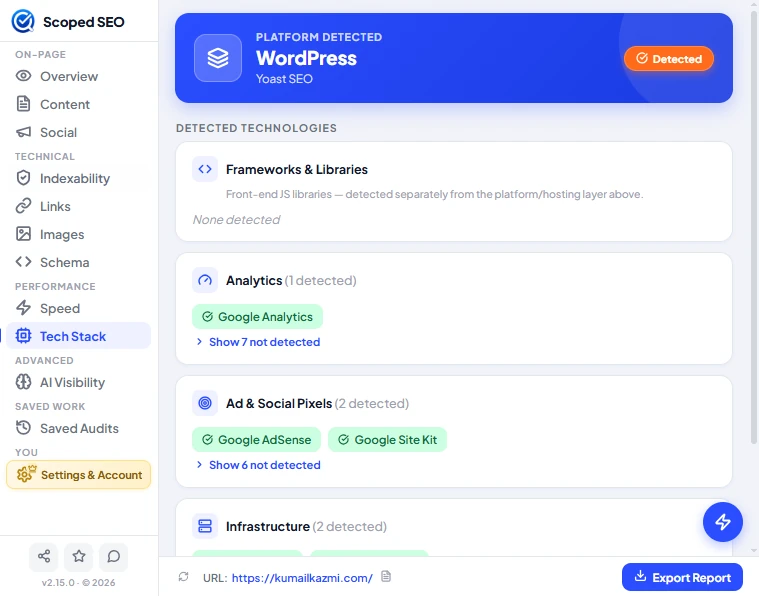
The Tech Stack tab lists what Scoped SEO detects on the page you're auditing. It sits under Performance in the sidebar, next to Speed.
Platform detected
The blue banner at the top names the platform behind the page, such as WordPress, with a related tool underneath when one is found (Yoast SEO in the example). A Detected badge confirms it was found on the page.
Detected technologies
Below the banner, technologies are grouped into category cards: Frameworks & Libraries, Analytics, Ad & Social Pixels, Infrastructure and more further down.
- Each card shows how many technologies were detected in it, and the detected ones appear as green chips.
- A category with nothing found says None detected.
- Show N not detected expands the list of technologies Scoped SEO looked for in that category and didn't find, so you can tell "not present" from "not checked".
- Frameworks and libraries are detected separately from the platform and hosting layer shown in the banner.
How to read it
- Detection works from what the page itself exposes to your browser, so treat the list as a strong hint rather than a guarantee. A technology that leaves no trace in the page can't be detected.
- Detection runs in your browser against the page you're on. Nothing about the page is uploaded.
In reports and saved audits
Detected technologies are included in PDF, DOCX and CSV reports, and the Speed section of a report also carries the tech stack detection. Saved audits keep what was detected at the time.