 Scoped SEO
 Add to Chrome
Getting started
Install Scoped SEO, run your first audit and learn your way around the popup in about five minutes.
Install the extension
- Pick your browser. Chrome, Edge, Brave and other Chromium browsers install from the Chrome Web Store. Firefox installs from Firefox Add-ons.
- Add it. Press Add to Chrome (or Add to Firefox) and confirm the prompt. There is no sign-up form and nothing to configure.
- Pin it. Open the extensions menu (the puzzle-piece icon) and pin Scoped SEO so its icon stays in your toolbar.
Note. The screenshots in these docs were taken in Chrome with version 2.15.0. Layout can differ slightly in other browsers.
Run your first audit
- Open any web page. Use a normal page. Browser-internal pages such as
chrome://orabout:pages can't be audited because browsers don't let extensions read them. - Click the Scoped SEO icon. The popup opens and scans the page you're on. Results appear in a few seconds.
- Start on Overview. Read the three scores, then follow any issue to the tab that explains it.
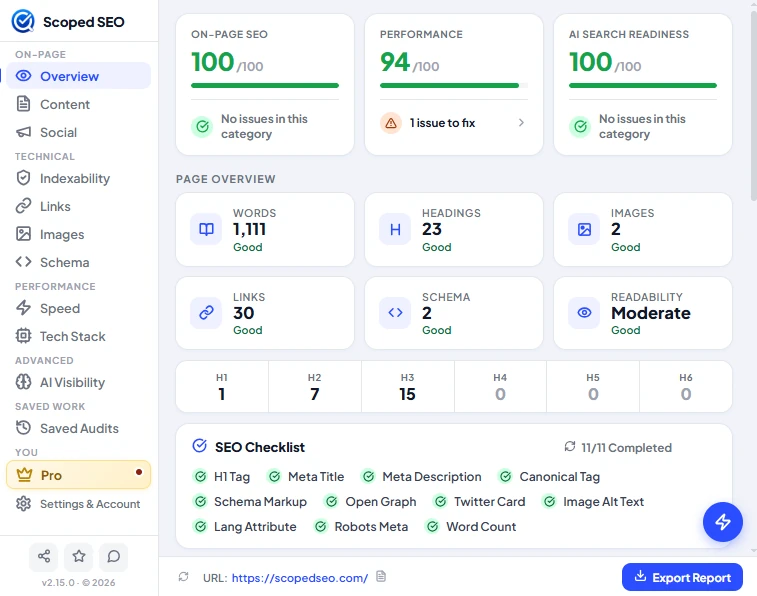
You don't need an account for any of this. Every audit tab works the moment you install.
A tour of the popup
The sidebar on the left groups the tabs. The bar along the bottom shows the page you're auditing and holds the Export Report button.
| Sidebar group | Tabs | What it covers |
|---|---|---|
| On-page | Overview, Content, Social | Scores, title and headings, readability, Open Graph and Twitter Card tags |
| Technical | Indexability, Links, Images, Schema | Whether the page can be indexed, its links and images, and its structured data |
| Performance | Speed, Tech Stack | Core Web Vitals, load timeline and detected technologies |
| Advanced | AI Visibility | AI Search Readiness: crawler access and what AI systems can read |
| Saved work | Saved Audits | Audits you saved on this device |
| You | Pro, Settings & Account | Plan details, sign-in, preferences, report branding and your data |
Three more controls are worth knowing about:
- Export Report (bottom right) turns the audit into a PDF, Word or CSV file. See Exports and limits.
- The round lightning button opens the quick actions: save the audit, re-scan the page and more.
- Target icons next to headings, links, images and some issues locate the element on the page.
Where to go next
Something unclear or out of date? Tell us or email support@scopedseo.com. These docs describe version 2.15.0.