 Scoped SEO
 Add to Chrome
Plans and limits
What Free and Pro include, how billing works, and where to cancel or ask for a refund.
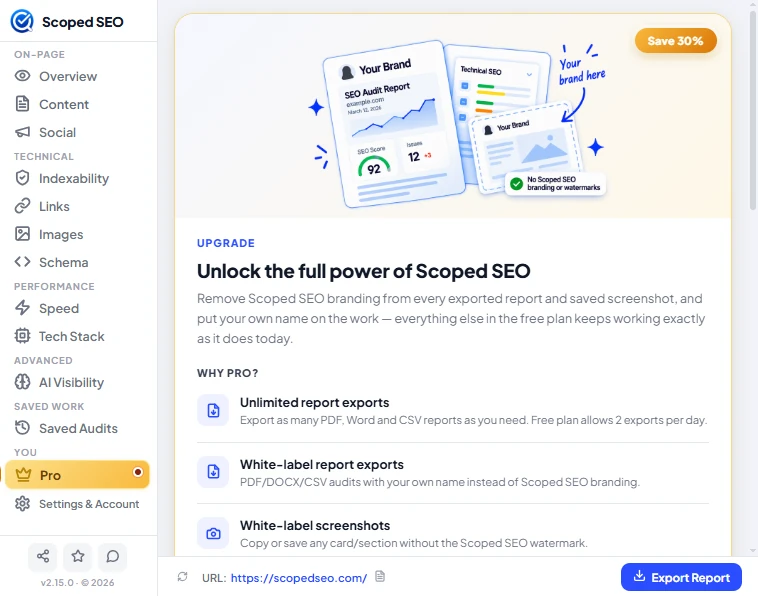
Every audit check is identical on both plans. Pro lifts limits and removes Scoped SEO branding from what you share.
Free and Pro
| Free | Pro | |
|---|---|---|
| Audit tabs and scoring | All of them | All of them |
| Audits per day | Unlimited | Unlimited |
| Saved audits | Up to 10 | Unlimited |
| Report exports (PDF, DOCX, CSV) | 2 per day, Scoped SEO branding | Unlimited, your name and logo |
| Screenshots | Watermarked | White-label |
| Support | Priority email |
Current prices are on the pricing page. Billing, receipts and tax are handled by Paddle, the Merchant of Record, so Scoped SEO never sees your card number.
Getting Pro
- Sign in or create an account on the account page or in the extension. Pro is tied to the account.
- Choose a plan on the pricing page and complete checkout with the same email.
- Open the extension. Pro appears automatically. If it doesn't, press Refresh in Settings & Account, Subscription.
Cancel, refunds and receipts
- Cancel from Manage in the Subscription tab, the account page, or the link in your Paddle receipt. Pro stays on until the paid period ends.
- Refunds are available within 14 days of a purchase or renewal. See the Refund Policy, then email support@scopedseo.com with your Paddle order reference.
Something unclear or out of date? Tell us or email support@scopedseo.com. These docs describe version 2.15.0.