 Scoped SEO
 Add to Chrome
Overview
Three scores, a page overview, an SEO checklist, a Google search preview and one list of every finding.
Overview is where every scan starts. It summarises the other tabs so you can see where the page stands, then sends you to the tab that explains each issue.
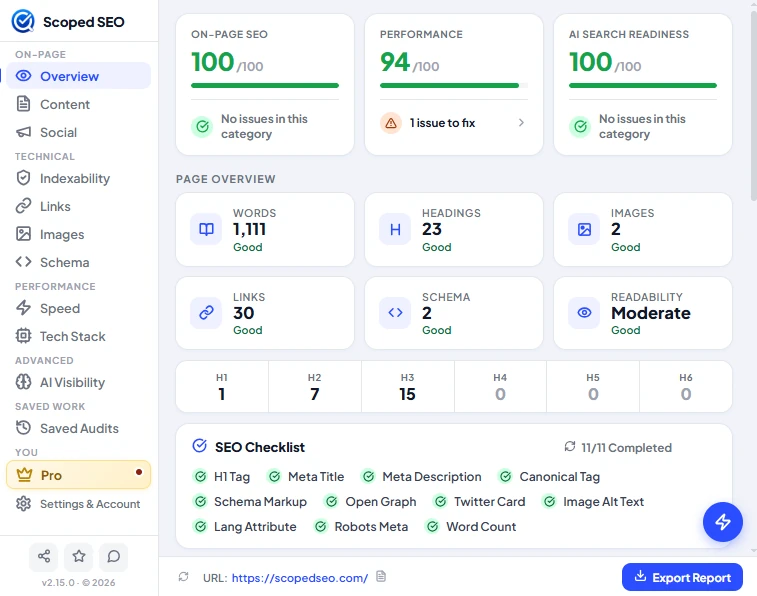
The three scores
- On-Page SEO out of 100, built from title, description, headings, canonical, images, links, schema and similar checks.
- Performance out of 100. This is a Scoped SEO indicator built from timings your browser reports. It is not a Lighthouse score. See Speed.
- AI Search Readiness out of 100, or a dash when there isn't enough data to score. See AI Search Readiness.
Under each score is a one-line status such as "No issues in this category" or "1 issue to fix". Click it to jump to the issues.
Page overview tiles
Six tiles show the Words, Headings, Images, Links and Schema counts and a Readability rating, each with a Good, Review or similar label. A strip below them counts headings from H1 to H6.
SEO checklist
The checklist covers the H1 tag, meta title, meta description, canonical tag, schema markup, Open Graph, Twitter Card, image alt text, language attribute, robots meta and word count. Hover an item for a short explanation.
- Checks that don't apply to the page are left out of the total. A page with no images doesn't lose a point for alt text, and a page with no robots tag isn't marked down for it. A clean page reads 10/10 or 11/11, not 10/11.
- A robots tag that blocks indexing shows as a warning, not a pass.
Google search preview
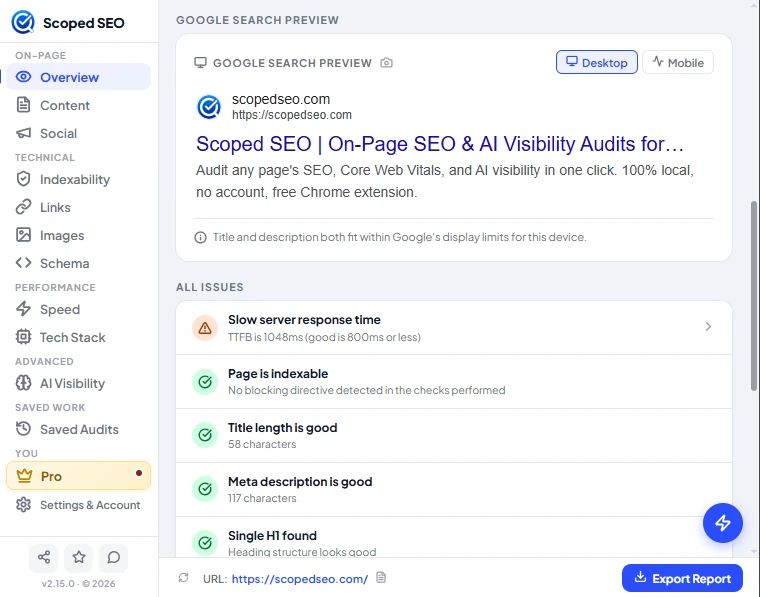
The preview shows how the title and description are likely to appear in Google, with a note on whether they fit the display limits for the selected device. The favicon in the preview is loaded through Google's favicon service, which means Google receives the domain being previewed. This is the one request in the extension that discloses a domain to a third party, and it is listed in Privacy and permissions.
All issues

Failed and warning items open the tab that explains them. Passed items stay in the list so you can see what was checked. Issue wording is specific, for example "TTFB is 1048ms (good is 800ms or less)" rather than "slow server".
The footer bar
The bar at the bottom shows the URL being audited. The refresh icon re-scans the page. Export Report opens the format menu. See Exports and limits.